
What is a .com.np Domain?
A .com.np domain is a free Nepali domain extension managed by Mercantile Communications. Any Nepali citizen or student can register one completely free. No credit card. No payment. Just a few documents and you are good to go.
This guide shows you exactly how I got my own free .com.np domain and connected it to Cloudflare Pages for free hosting. If you already have your domain sorted and want to host it, check my Cloudflare hosting guide.
Who Can Apply?
You can apply if you are:
- A Nepali citizen with a valid citizenship card
- A student with a college ID or enrollment letter
- A registered business in Nepal
Good news for students — you only need your college ID and a scanned copy of your citizenship. No fees, no renewal cost, completely free forever.
The Problem Nobody Warns You About
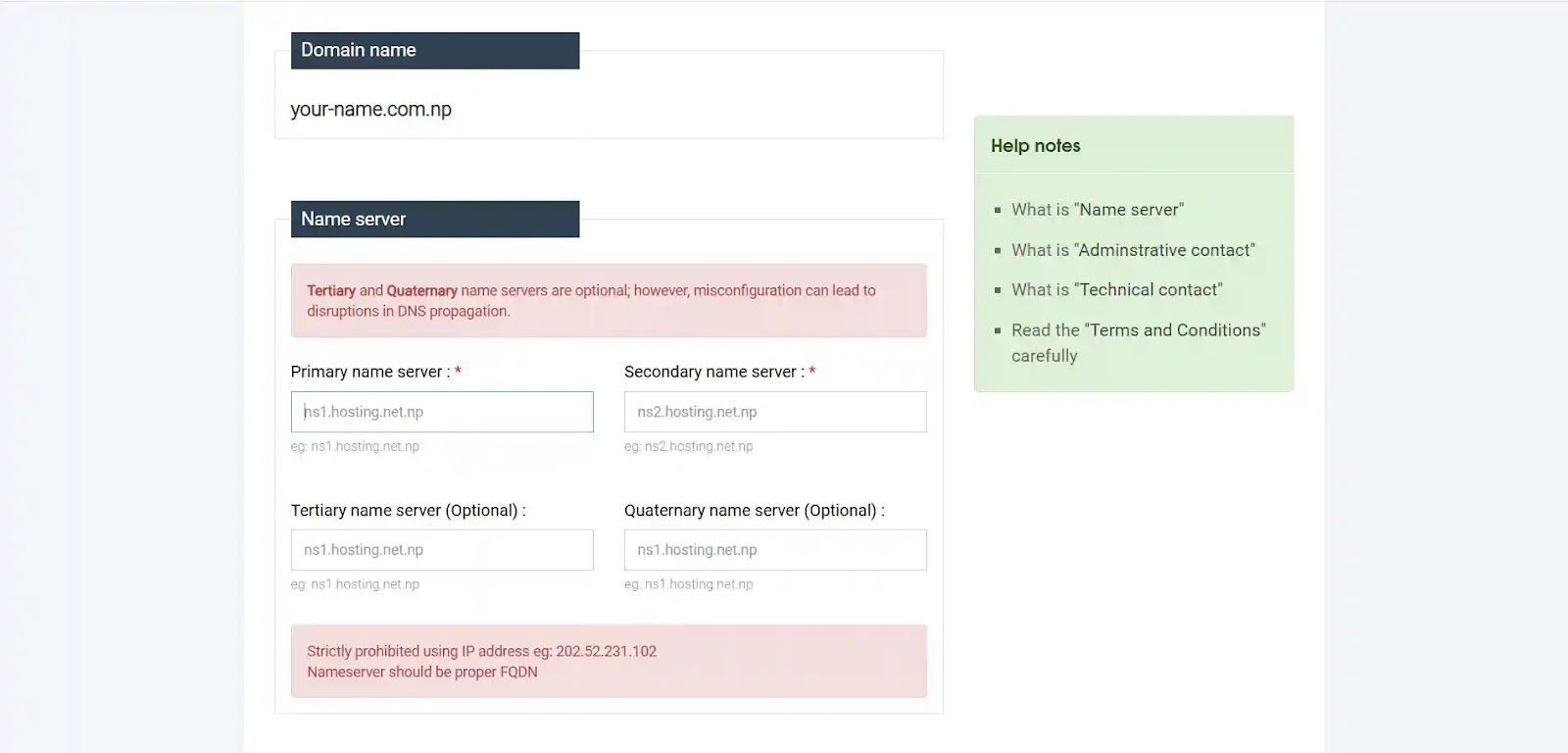
Okay so here is the thing. When you first open register.com.np to register your domain, the form asks you to enter nameservers. You think — okay fine, I will get those from Cloudflare. So you go to Cloudflare to set up hosting. But Cloudflare says — sorry, you need to enter your domain first before we give you nameservers.
So you go back to Mercantile. They want nameservers. You go to Cloudflare. They want a domain. You go back to Mercantile. They want nameservers again.
I know it sounds really frustrating. I went through the exact same thing — spent time going through YouTube videos, forums, Reddit threads, trying to figure out why this loop never ends. Nobody explained it clearly. Most tutorials just skip this part entirely like it does not exist.
But once you understand the fix, it is actually very simple. Here it is:
How to Break the Deadlock — The Simple Fix
The trick is to use placeholder nameservers during your initial registration. Mercantile just needs something in that field to accept your application. You will replace them with your real Cloudflare nameservers later once everything is approved.
Here is the exact flow:
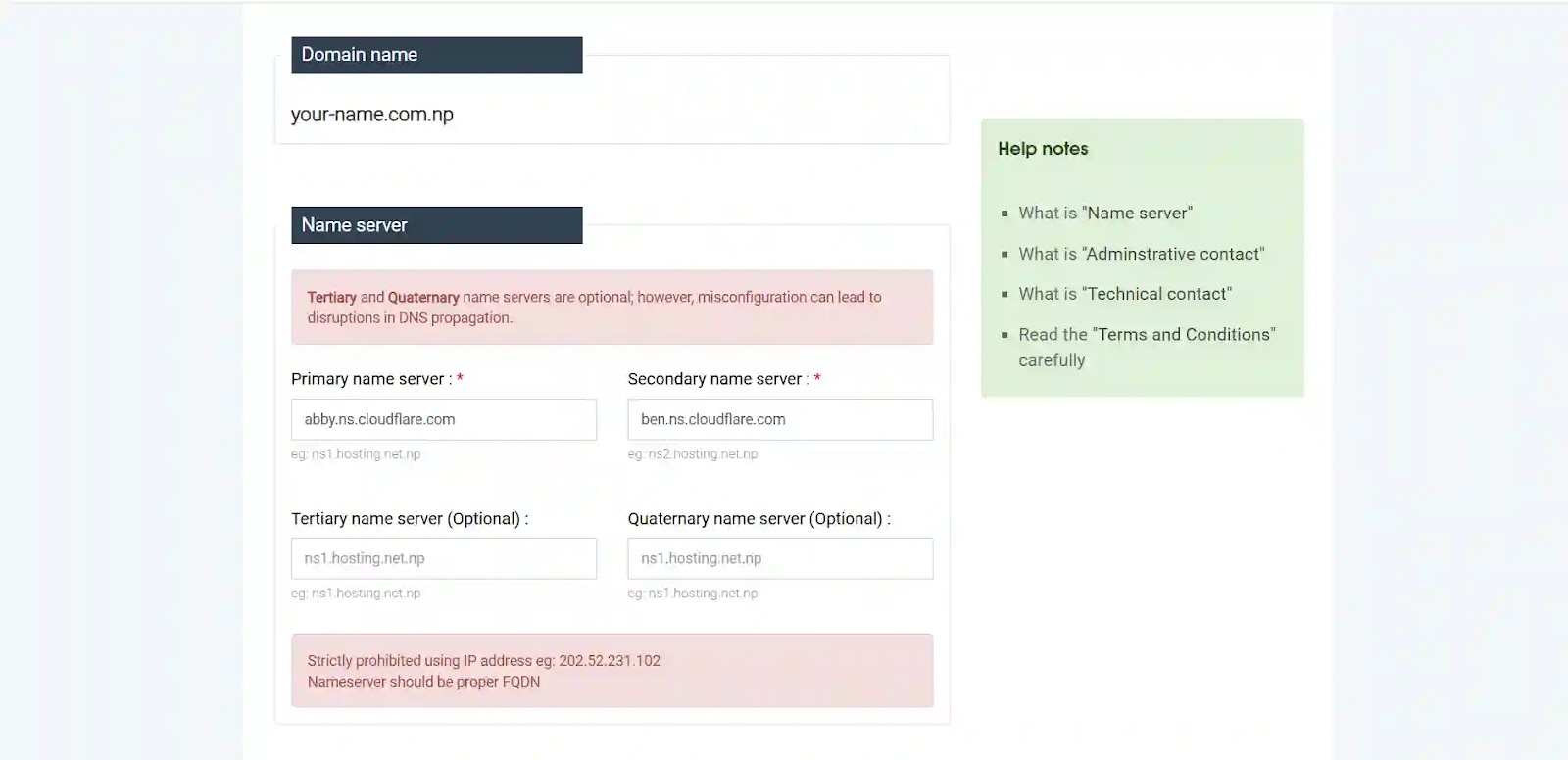
- On register.com.np, enter abby.ns.cloudflare.com and ben.ns.cloudflare.com as your nameservers during registration — these are Mercantile's own default nameservers and work perfectly as placeholders
- Submit your application with your documents and wait for Mercantile to approve your domain
- Once approved (usually 1 to 3 days), go to Cloudflare and add your domain — now Cloudflare will give you your 2 real unique nameservers
- Come back to register.com.np and replace the placeholder nameservers with your actual Cloudflare ones
- Wait a few hours for everything to update and you are done
That is it. Use placeholders first, get approved, then switch. Simple once you know it — but genuinely confusing if nobody tells you.
Step-by-Step: Register Your Free .com.np Domain
Now that you know the trick, here is the full registration process:
- Go to register.com.np and create a free account
- Search for your desired domain name such as yourname.com.np
- Fill in the registration form with your personal details
- In the nameserver fields enter abby.ns.cloudflare.com and ben.ns.cloudflare.com
- Upload a clear scan of your citizenship card and college ID (under 2MB each)
- Submit and wait 1 to 3 business days for the approval email
Pro tip — keep your domain name short and use your real name if possible. Something like yourname.com.np looks far more professional on a CV than a random subdomain. It is free so there is no reason not to.
After Approval — Your Domain is Now Active
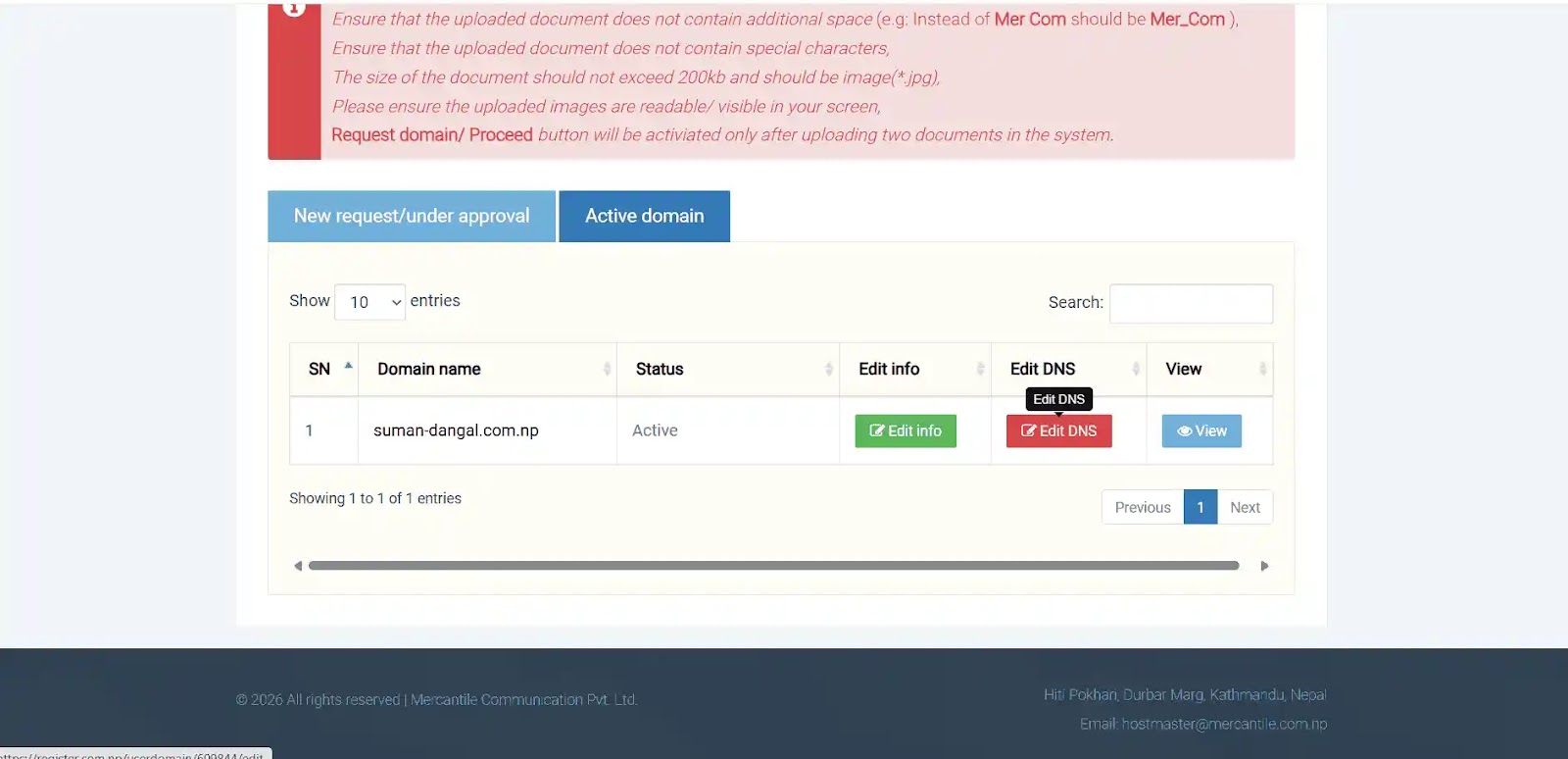
Once you get the approval email from Mercantile, log back in to register.com.np and go to My Domains. You will see your domain listed with a green Active status. This is also where you will find the Edit DNS or nameserver settings button that you will need in the next step — keep this page open.
Add Your Domain to Cloudflare and Get Your Real Nameservers
Now that your domain is live, go set up Cloudflare:
- Log in at cloudflare.com and click Add a Site
- Enter your .com.np domain and select the Free plan
- Cloudflare will scan your existing DNS records automatically
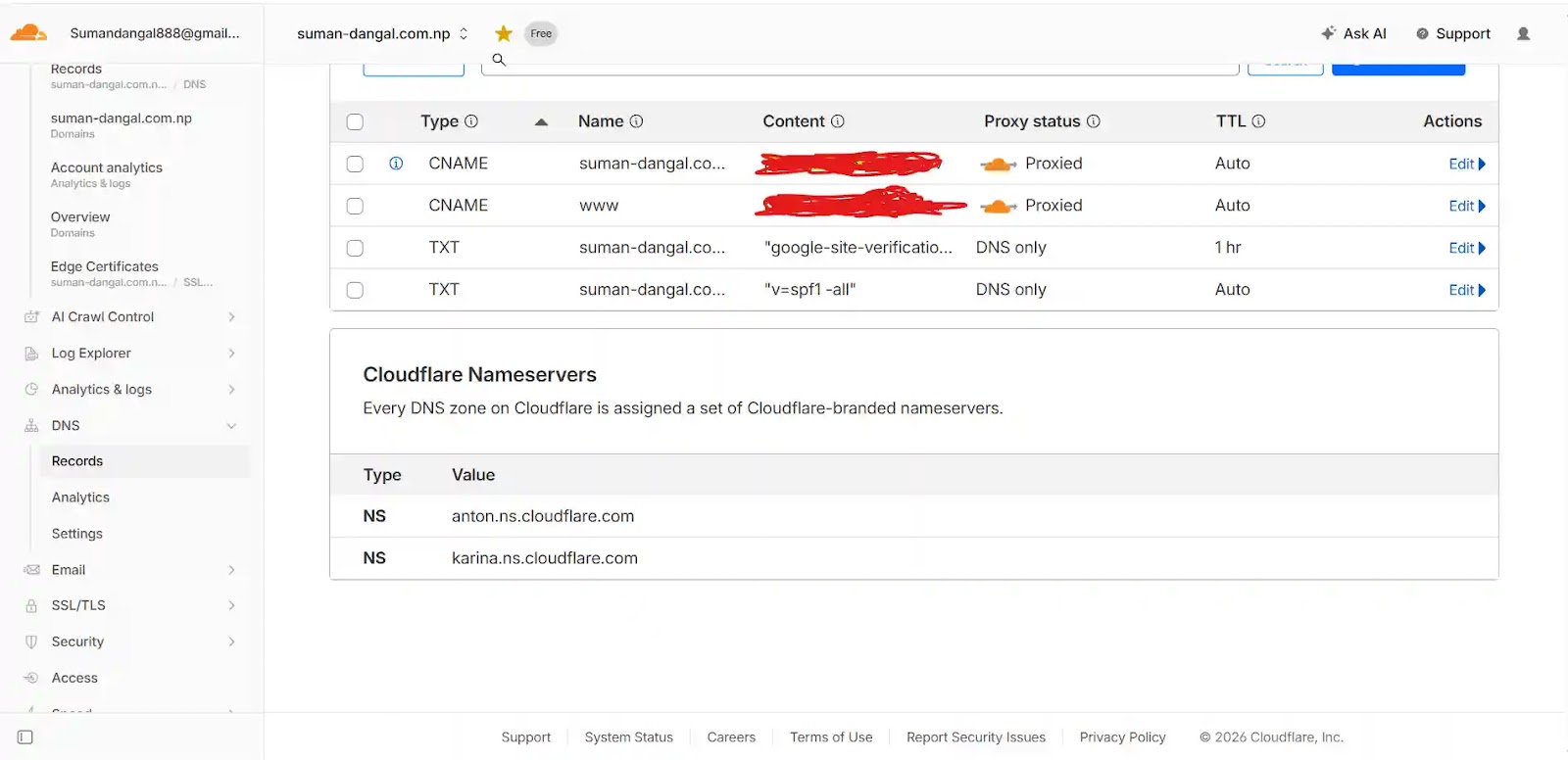
- On the next screen Cloudflare gives you 2 unique nameservers — they look something like ada.ns.cloudflare.com and bob.ns.cloudflare.com
- Copy both of them carefully — you need these in the next step
Replace Your Placeholder Nameservers
This is the final step and the one that actually connects everything together:
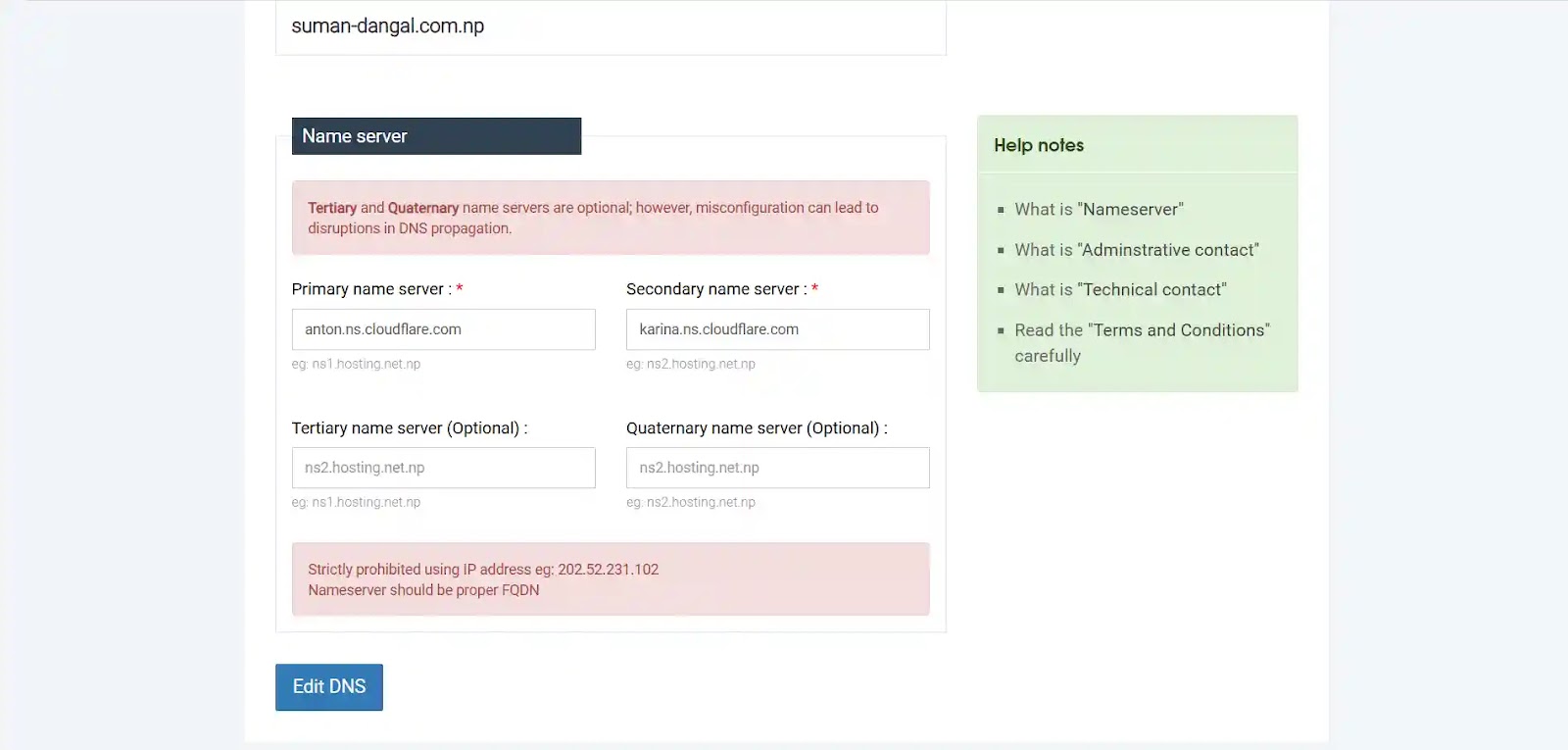
- Go back to register.com.np and click the Edit DNS button you saw earlier
- Delete ns1.mos.com.np and ns2.mos.com.np completely
- Paste in your two Cloudflare nameservers exactly as copied
- Save and submit the changes
Mercantile will process this within a few hours. Once done, Cloudflare marks your domain as Active and you automatically get free HTTPS, a global CDN, and DDoS protection — all at zero cost.
DNS propagation usually takes 2 to 4 hours in Nepal. You can check the status at whatsmydns.net — just enter your domain and watch it go green across different locations.
Common Problems and How I Fixed Them
Domain not approved after 5 days — Email hostmaster@mos.com.np with your application reference number. They usually reply within a day.
Nameserver update not working — Double check that you fully deleted the old placeholders before saving the new ones. Both being present at the same time causes conflicts.
Cloudflare shows Pending for too long — Just wait. Do not make any other changes. It usually resolves within 24 hours on its own.
Document rejected — Make sure your scan is clear, not blurry, and under 2MB. Adobe Scan on your phone works really well for this.
Why Bother With .com.np Instead of a Free Subdomain
A lot of beginners start with yourname.github.io or yourname.netlify.app. Those are fine for learning but they do not look serious on a CV or job application. A proper .com.np domain immediately signals to employers that you put in that extra effort. And since it costs absolutely nothing, there is genuinely no reason to skip it.
Final Thoughts
Getting a free .com.np domain is straightforward once you know about the nameserver deadlock. Use abby.ns.cloudflare.com and ben.ns.cloudflare.com as placeholders during registration, get approved, then switch to your real Cloudflare nameservers. That one trick saves you hours of confusion.
Pair it with Cloudflare Pages and you have a proper professional portfolio website running for free — which is exactly what this site runs on.
If you get stuck at any point, feel free to reach out through the contact page. Happy to help.